
How to make WordPress theme?
Published: March 31, 2026
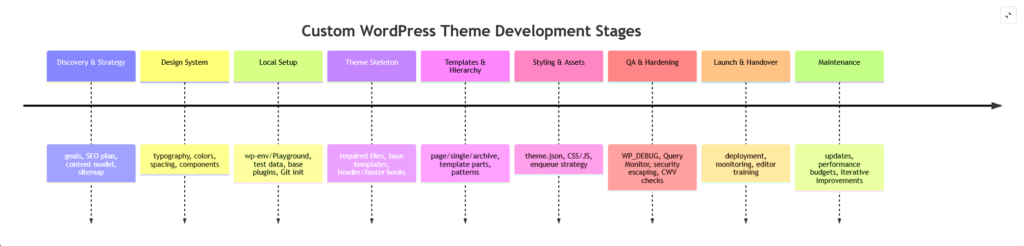
At a high level, the build process looks like this: set up a safe local environment, scaffold a theme, implement required files (classic or block), wire templates to the template hierarchy, enqueue assets correctly, add theme.json (even in classic themes if you want editor + global style consistency), then test/debug with WP_DEBUG + tooling and ship via a Git-based workflow.
That is why this is the way we are making websites for small businesses.
A custom-coded theme is the most controlled way to build on WordPress when you care about predictable performance, long-term maintainability, and an editing experience that matches your business (not the theme vendor’s feature list). It lets you design around your real content model and ship only what you need templates, styles, and scripts using WordPress’ official systems (template hierarchy, hooks, theme.json, and the enqueue pipeline).
This article is practical and version-aware. The WordPress version is unspecified, so anything tied to block themes and theme.json versions should be validated against the project’s target version. Block themes are available from WordPress 5.9+, while the “living” theme.json v3 spec targets WordPress 6.6+ (and the latest Gutenberg plugin).
Why is custom theme best approach?
Why a custom-coded theme often outperforms “builder-first” and off-the-shelf approaches comes down to control over three things: markup/DOM output, dependency surface area, and change management.
Visual builders like Elementor can legitimately speed up prototyping, but their flexibility is partly achieved by adding layers of wrapper elements. Elementor’s own developer documentation acknowledges user feedback that many wrappers are unnecessary and that they “increase the size of web pages and harm performance,” describing wrapper removal as a performance win. The reason this matters is not abstract: Google’s performance guidance explains that large DOM sizes can make interactions slower and are a factor in responsiveness metrics (e.g., INP), and Lighthouse audits flag excessive DOM size for the same reason.
Off-the-shelf themes can be excellent, but the business model of “one theme fits many niches” often encourages shipping broad features, layouts, and assets. In contrast, custom code lets you intentionally ship only what the project needs, templates, styles, and scripts and load them via WordPress’ enqueue system and hooks for compatibility and predictability.
Compared to building a non-WordPress custom site, WordPress gives you a mature publishing/admin system and a huge ecosystem; the official directory alone lists 62,000+ plugins, and there are thousands of themes you can use as references or as baselines. The Croatian academic paper from TVZ also highlights WordPress’ adaptability and the value of a custom template for a specific solution, including enabling admins to update site sections through the WordPress interface rather than editing code.
We build custom websites for each client, no “one-size-fits-all” templates. The goal is a site that fits your content and conversion goals, stays fast as it grows, and remains maintainable for years. This is also easier to sell internally: you’re paying for a system you own and can evolve, not a pile of brittle page-builder layouts.
WordPress has two main theme paradigms today
Block themes (available from WordPress 5.9+) are built mainly from HTML templates plus a theme configuration file, and they allow editing all parts of the site in the Site Editor. Classic themes are PHP-template-based and have no version limitation; they rely on WordPress functions, hooks, and filters in PHP.
theme.json is a configuration file used to define global settings and styles; it works with both block and classic themes. The Theme Handbook calls it foundational for block theming and practically necessary for most serious theme projects.
Template hierarchy is the mechanism WordPress uses to determine which template file to load for a given request. The theme handbook emphasizes that template files are modular and reusable, and the template hierarchy docs describe how the template loader uses query context to select the best match, with fallbacks.
In this guide, we will focus on the development of a classic WordPress theme, with some notes for the development of a block theme.
How to make a basic theme
Below is a minimal-but-correct approach for both classic and block themes. “Minimal” here means: it activates, it renders content, it uses WordPress hooks properly, and it won’t break plugins by omitting essential template tags.
Also note: requirements differ depending on whether you’re aiming for your own site or submission to the WordPress theme directory. For example, classic themes in the directory require files like comments.php and a screenshot, while block themes require theme.json, readme.txt, etc., for directory submission.
Recommended file structure (classic):
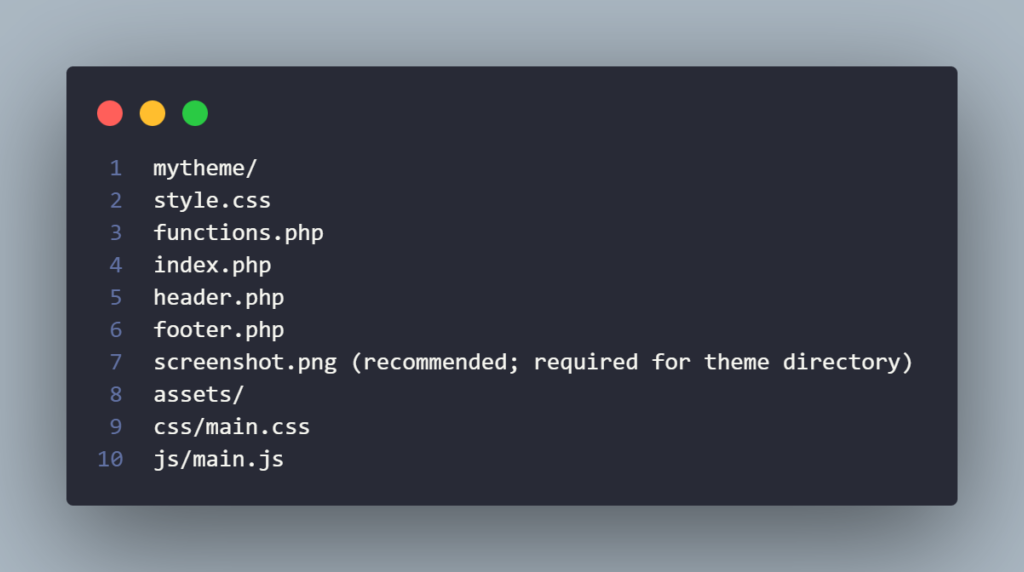
This aligns with the idea that themes commonly use an /assets directory for CSS/JS/media, while functions.php is the hub for theme features and hooking into WordPress.
style.css (required header + minimal CSS)
(WordPress uses the stylesheet header to recognize and display theme metadata.)
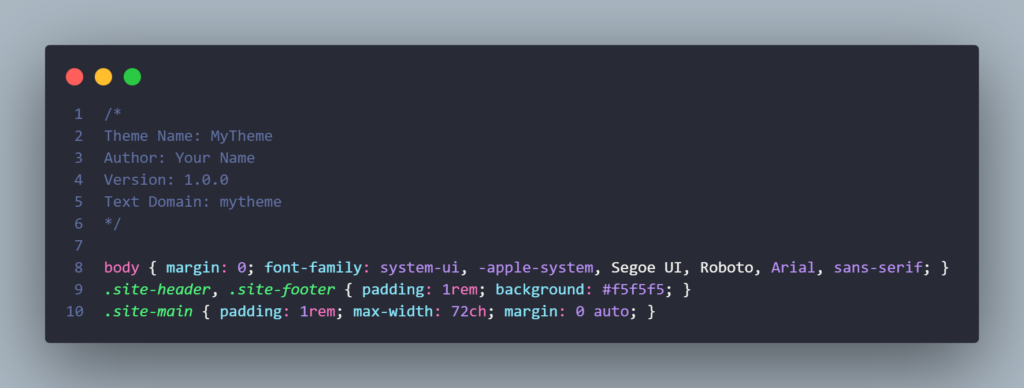
functions.php (theme setup + enqueue assets)
Use functions.php to add theme features and modular functionality via hooks.
Enqueue frontend assets using the wp_enqueue_scripts hook (it’s for scripts and styles).
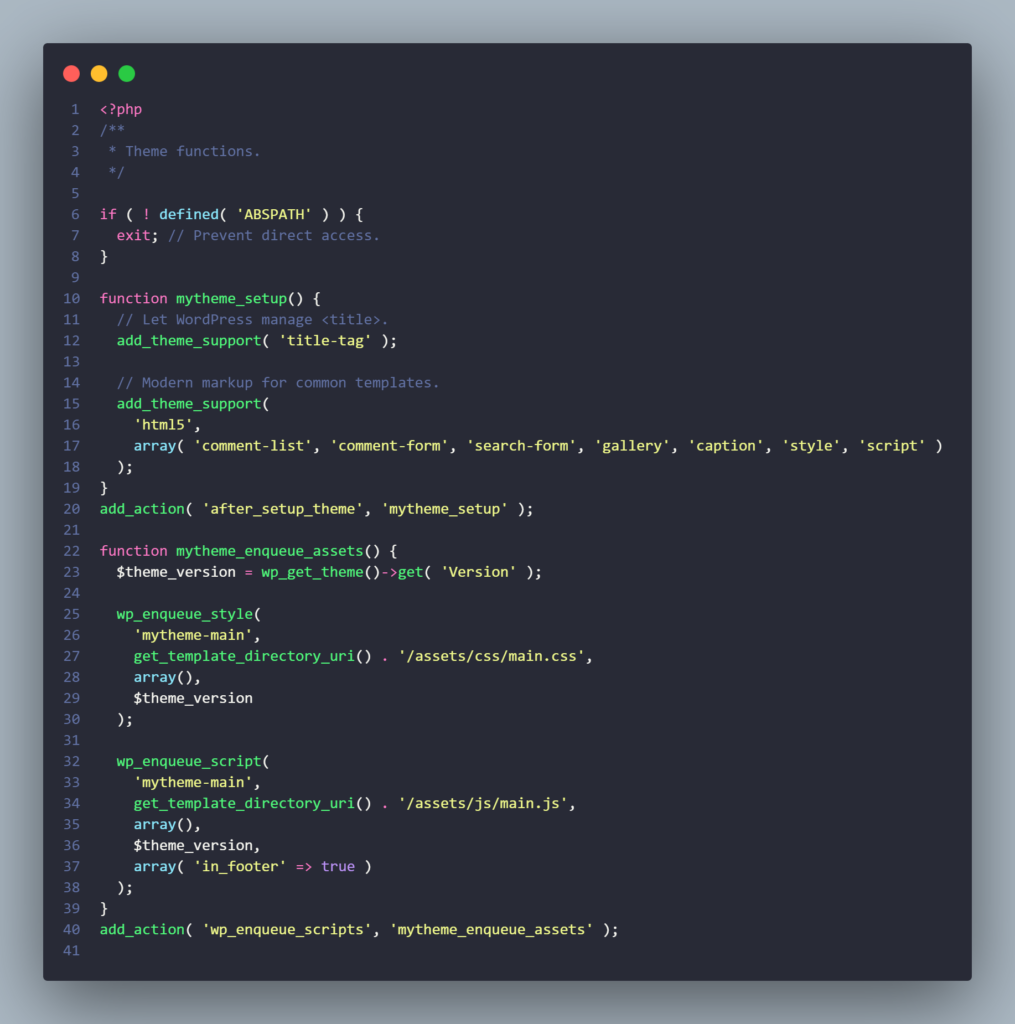
Why this pattern matters:
wp_enqueue_scriptsis the proper hook for front-end enqueues.- Calling
wp_enqueue_script()outside an action hook can cause problems (WordPress docs explicitly warn about this).
header.php (must include wp_head + wp_body_open)
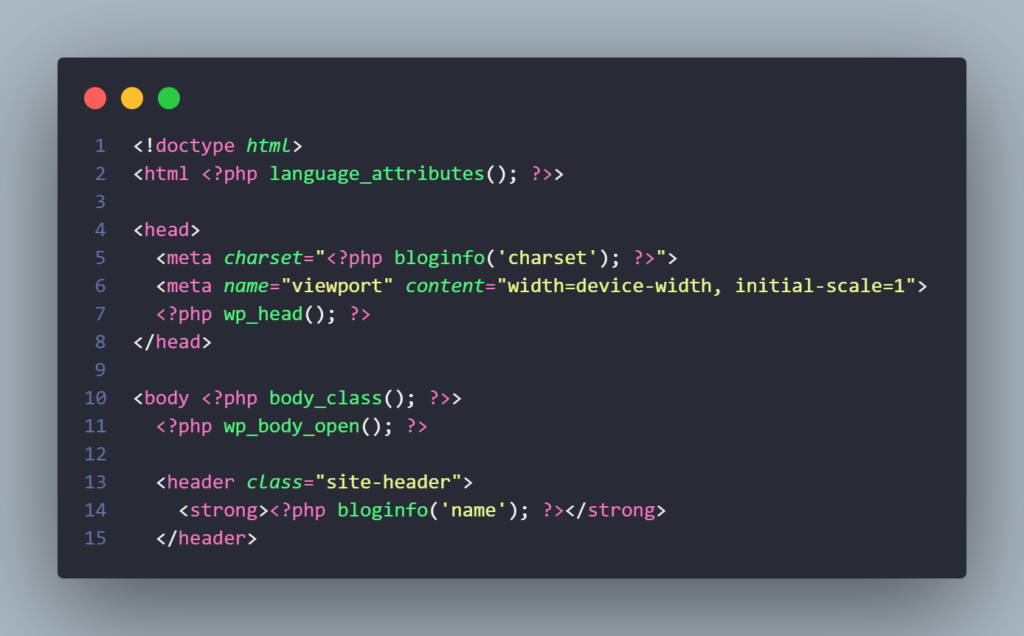
language_attributes() outputs language/direction attributes for the <html> tag. bloginfo( 'charset' ) reads the site charset (always UTF‑8 in modern WP defaults). wp_head() triggers the wp_head hook used by plugins/themes to print scripts/data in <head>. wp_body_open() exists since WordPress 5.2 and fires an action immediately after <body> opens (commonly used for tag managers/accessibility).
footer.php (must include wp_footer)
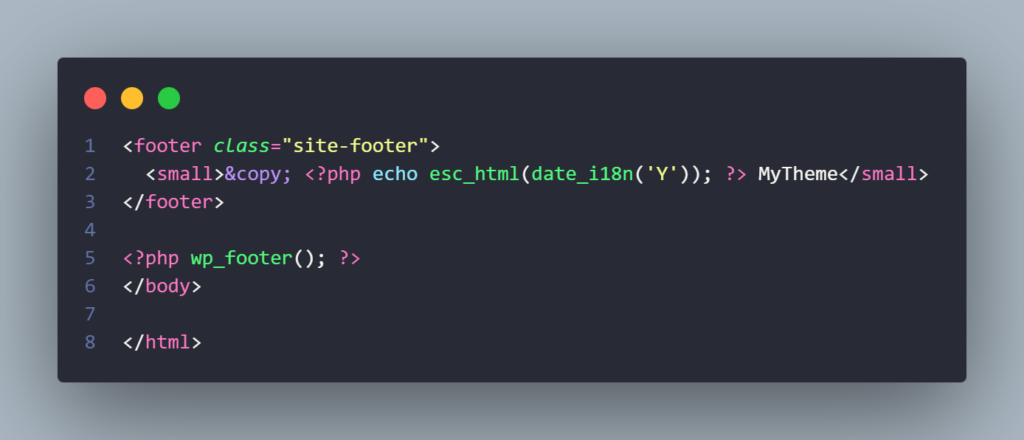
wp_footer() fires the wp_footer action; omitting it is a frequent cause of plugin breakage and missing scripts.
index.php (fallback template + The Loop)
index.php is the main fallback template in the hierarchy; the loop is the default mechanism to output posts/content.
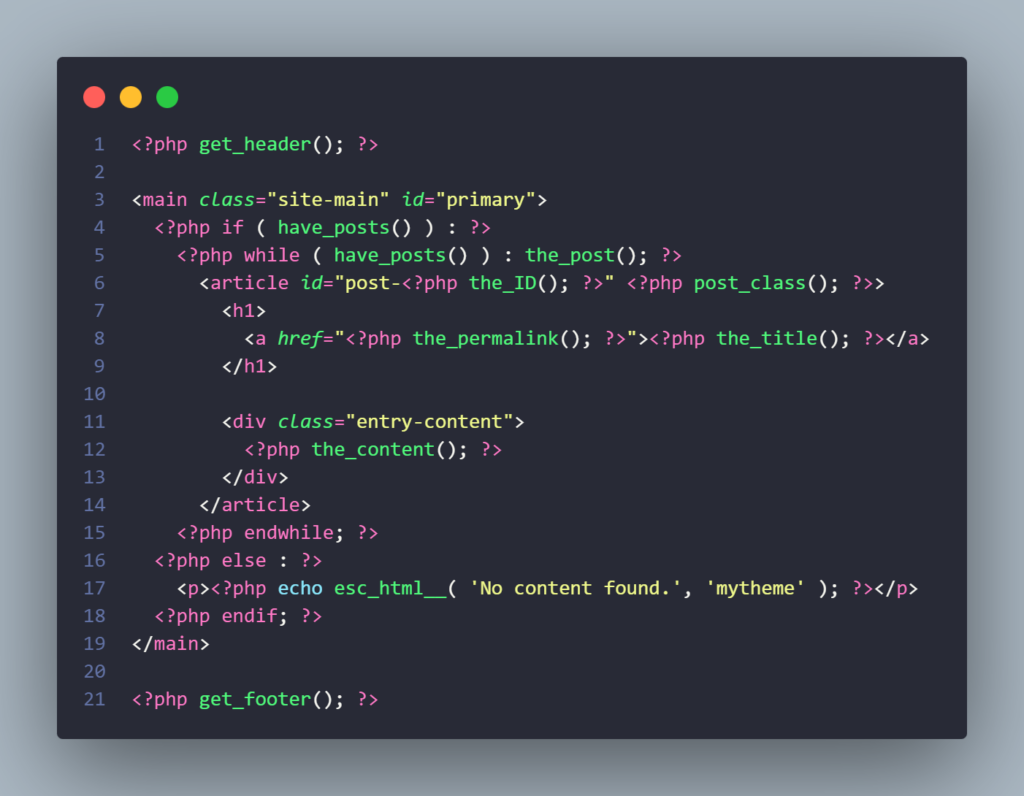
get_header() / get_footer() load the header and footer templates.post_class() prints semantic classes for the post wrapper and escapes its output correctly.
Development workflow and tooling
A professional theme workflow starts by not building on production. The Theme Handbook explicitly recommends a separate development environment so you can test without taking down a live site, and it lists multiple local environment options.
Local development options (practical shortlist):
wp-env(@wordpress/env) can spin up a local WordPress site for theme/plugin development “without any additional configuration,” and it relies on Docker + Node/NPM.- WordPress Playground can be used as a zero-setup environment; official docs cover using it for development and its limitations.
- For block theme workflows where Site Editor changes are stored in the database, the WordPress Developer Blog describes combining Playground with the Create Block Theme plugin and GitHub to write “Save Changes to Theme” back into files and keep changes version-controlled.
WP-CLI + scaffolding (speed and consistency):
WP-CLI is the command-line interface for WordPress and supports tasks like installing/updating themes/plugins.
For theme codebases, scaffolding saves hours:
wp scaffold _s mytheme --theme_name="My Theme"generates a theme based on_sand confirms creation.wp scaffold child-theme ...generates a properly structured child theme.
Git + build tools (keep source clean, ship optimized):
The Theme Handbook explicitly describes a build process as converting source into a production form (often minifying/compiling CSS/JS).
It also shows a real-world advanced theme structure where files like .gitignore and package.json commonly appear—hinting at standard version control + Node-based build setups.
Pitfalls, debugging, and hardening
The majority of “my theme is broken” issues cluster into recognition, enqueues, missing hooks, and security hygiene.
Theme not recognized or won’t activate
- For block themes, WordPress needs
style.cssandtemplates/index.htmlas the required foundation. - For classic themes,
style.cssandindex.phpare core, but if you’re targeting the theme directory,comments.php+ screenshot requirements also apply.
CSS/JS not loading (or loading everywhere)
- Always enqueue on
wp_enqueue_scriptsfor frontend (it’s for both scripts and styles). - WordPress warns that calling
wp_enqueue_script()outside an action hook can lead to problems. - Prefer conditional enqueues (by template or conditional tags) when assets are page-specific; this keeps output lean and predictable. (This is a best practice inference based on how the enqueue system and dependency management are designed.)
Plugins missing scripts / SEO plugins not working
- Ensure your templates fire
wp_head()andwp_footer(); WordPress documentation calls these hooks essential and widely supported.
Block theme edits “disappear” in Git
- Site Editor changes are stored in the database as user-level customizations; the Create Block Theme plugin can “Save Changes to Theme” by writing changes into
theme.jsonand HTML template files—in Playground workflows this is used specifically to integrate with version control.
Debugging stack that actually saves time
- Enable WP_DEBUG and log errors rather than showing them publicly; WordPress’ debugging docs describe how WP_DEBUG surfaces PHP warnings/notices and how to log them.
- Use Query Monitor: it exposes database queries, PHP errors, hooks, enqueued assets, HTTP calls, block editor data, and more.
Security basics in theme code (non-negotiable)
- WordPress security guidance emphasizes: don’t trust any data; validate/sanitize input; escape output; rely on WordPress APIs; keep your code up to date.
- The WordPress Themes Team review handbook explicitly requires themes to validate/sanitize untrusted data and escape untrusted output.
Client-facing benefits and sales points
If you’re selling custom development, you need language clients understand outcomes, not files.
We build custom sites in Pula, Istria for each client, meaning the theme is designed around your brand, content, and conversion goals not around a generic theme demo. The client-facing benefits most people actually care about:
- Speed that stays fast as you grow: Lean markup and controlled assets reduce performance risk; large DOM sizes are known to affect interactivity, and builder-generated wrapper-heavy output can contribute to that risk.
- SEO foundations you can control: Google’s page experience systems incorporate Core Web Vitals; performance work is part of technical SEO (not a guarantee, but a measurable advantage).
- Security and stability: Theme development should follow WordPress’ validate/sanitize/escape guidance and rely on WP APIs; fewer unnecessary plugins generally means fewer third-party moving parts to audit and update.
- Maintainability + easier handover: A theme built on official structures (template hierarchy,
functions.php, proper hooks, and optionallytheme.json) is easier for other developers to read and safer to update. - Editing experience aligned with your team: With
theme.json+ block tooling you can define a design system (colors/typography/spacing) and keep content editors inside guardrails.
New web is waiting for you
Request a free quote and together we will find the best solution for your business.